Build a niche edit request workflow that prioritises editorial relevance. Qualify publishers, send useful pitches and verify every published backlink.
Instead of manually chasing publishers and treating email approval as a finished backlink, use a niche edit request workflow that connects qualification, outreach, editorial review and live-link verification. This 2026 guide shows you how to manage that process without confusing a published link with a guaranteed ranking gain.
- A niche edit request workflow ends with a verified backlink, not an editor’s approval email.
- Linkible suits SaaS and ecommerce teams seeking managed link building rather than another outreach tool.
- Prioritise relevant publishers, useful destination pages and editorial discretion over exact-match anchor text.
- Separate editorial requests from sponsored placements, and record the published link attributes.
Why this matters
A niche edit adds a link to an existing article rather than creating a new guest post. The useful version fills a genuine reference gap: a reader needs supporting information, and your destination page supplies it.
The risky version starts with an anchor-text demand and searches for somewhere to insert it. Existing content does not make a placement legitimate; editorial purpose and the circumstances of the link matter.
For a 2026 campaign, judge the workflow by the relevance and verifiability of its deliverables. Linkible’s link building services are relevant to teams evaluating managed outreach, but the same qualification checklist applies whether you work internally or appoint an agency.
Before you start
- Access: Prepare an authorised outreach mailbox, a shared campaign tracker and access to the destination page. Assign an owner who can answer editorial questions and approve changes.
- Materials: Have the target URL, a concise explanation of its reader value and the exact passage on the publisher’s page that needs a reference. Check that the destination works without a login.
- The gotcha: Agree how to handle commercial placement requests before outreach begins. Google identifies buying links for ranking purposes as link spam; advertising links should be qualified with
rel="sponsored", withnofollowalso acceptable.
You do not need access to the publisher’s content management system. The editor makes the change; your responsibility is to supply an accurate request and verify what appears publicly.
Campaign record configuration
Create a shared spreadsheet or CRM record before sending messages. The bold field names below are labels to create in your own tracker, not claims about a particular software interface.
Set up the request record
- Create Publisher URL and Target URL fields. Record the exact article you want updated and the exact destination you want cited, not just the two domains.
- Add Contact, Owner, Reader benefit and Proposed context. Explain what the reader gains and where the reference belongs.
- Create a Status field with these values: Qualified, Sent, In discussion, Approved, Live, Verified and Closed. Keep rejection and withdrawal reasons in Closure reason.
- Add Last action, Next action, Published URL, Anchor text, Link attribute and Verification date. Leave unpublished details empty rather than recording assumptions as facts.
Expected result: Another team member can open a record and understand the request, its owner and the next action without searching an inbox.
Keep Approved separate from Live, and Live separate from Verified. These are different events: an editor can approve an idea without implementing it, and a published link can point to the wrong destination.
Define the completion gate
Require 2 checks before moving a record to Verified: confirm the link on the public article, then confirm that its destination resolves correctly. These are workflow requirements, not performance benchmarks.
For 2026 reporting, keep publication evidence separate from ranking observations. A verified backlink proves that a placement exists; it does not prove that the placement caused a subsequent search-performance change.
Publisher and page qualification
Qualify the specific article before writing the pitch. A relevant domain does not make every page on that domain a suitable place for your link.
Assess the editorial fit
- Read the complete article. Identify the question your destination answers and record that relationship in Reader benefit.
- Check the destination against the proposed context. A SaaS integration article needs a relevant explanation or resource, not an unrelated product pitch. An ecommerce buying guide needs information that supports the purchase decision.
- Review the publisher’s content and editorial contact route. Reject hacked pages, unauthorised insertions and requests to conceal a commercial arrangement.
- Check whether your link adds something beyond references already present. If the article already answers the question well, close the prospect rather than forcing an insertion.
- Record the reason for approval or rejection. Domain-level authority metrics can support research, but they do not establish article relevance or editorial legitimacy.
Expected result: Each qualified record contains a specific reference gap, a suitable destination and a defensible reason to contact the editor.
Separate the placement routes
An editorial request and a sponsored placement need different handling. Do not let an outreach conversation change categories without updating the campaign record.
| Route | Best for | Advantage | Limitation | Required handling |
|---|---|---|---|---|
| Editorial reference request | A useful resource that directly supports an existing passage | Gives the editor a reader-focused reason to update the article | The editor controls acceptance, wording and link treatment | Request a citation without demanding ranking credit |
| Sponsored placement | Disclosed promotion on a relevant publication | Makes the commercial relationship explicit | A sponsored link is not a promised transfer of ranking value | Require appropriate link qualification and record the arrangement |
Neither route guarantees rankings. If your brief requires an unqualified paid link, change the brief rather than disguising the arrangement as editorial outreach.
Outreach and editorial approval
Use the tracker to control the handover from research to email. Manual outreach still needs a repeatable process; personalisation is not a substitute for ownership or accurate records.
Prepare and send the request
- Confirm that Contact identifies an appropriate editorial recipient. Use the publisher’s stated submission route where one exists, and honour requests not to receive further messages.
- Complete Proposed context before drafting. Name the article, identify the passage and explain the missing information.
- In your email, complete To with the verified recipient and Subject with a specific description of the article update. Avoid claiming that the editor has made an error unless you can demonstrate it.
- Explain the resource in plain language. Ask the editor to assess its usefulness rather than demanding a particular anchor phrase or link attribute.
- Send 1 initial request per publisher article. Record the sent message under the existing record so another colleague does not contact the same editor independently.
- Move Status to Sent, update Last action and assign Next action. Keep follow-ups in the same conversation and stop after a clear rejection or opt-out.
Expected result: The editor receives a request that makes sense without a meeting, and your team can see exactly what was proposed.
A useful pitch contains the article reference, the relevant passage, the resource and the reader benefit. Remove unsupported praise, ranking promises and claims that adding your link will improve the publisher’s SEO.
Record the editorial decision
When an editor responds, save the actual decision. Approval of the topic is not approval of your proposed wording, and neither confirms publication.
If the editor requests a commercial arrangement, pause the original request and apply the sponsored-placement rules. If the editor changes the surrounding sentence, check that it still describes your destination accurately.
Expected result: An Approved record states what the editor accepted and identifies any unresolved condition before publication.
Publication verification and reporting
The final handover is from an email conversation to a publicly inspectable result. This is where a request becomes a deliverable.
Verify the live backlink
- Open the published article directly. Confirm that the link appears in the intended passage rather than in a comment, unrelated footer or different article.
- Select the link and check its destination. Confirm that the final page matches Target URL, including any redirects, and that the content is accessible.
- Inspect the link’s HTML using your browser’s developer tools. Record the actual anchor and
relvalues under Anchor text and Link attribute; use None observed when the link has norelattribute. - Record Published URL and Verification date. Save a dated screenshot or equivalent evidence alongside the record, while retaining the live URL as the primary reference.
- Move Status to Verified only after resolving discrepancies. Keep a separate note for later checks, since published pages can change.
Expected result: Your report shows the article, destination, context, anchor, attributes and verification date—not merely a publisher domain and an approval email.
The sequence matters: Qualify, Request, Approve, Verify, then Recheck. Skipping verification turns an outreach report into an unconfirmed activity log.
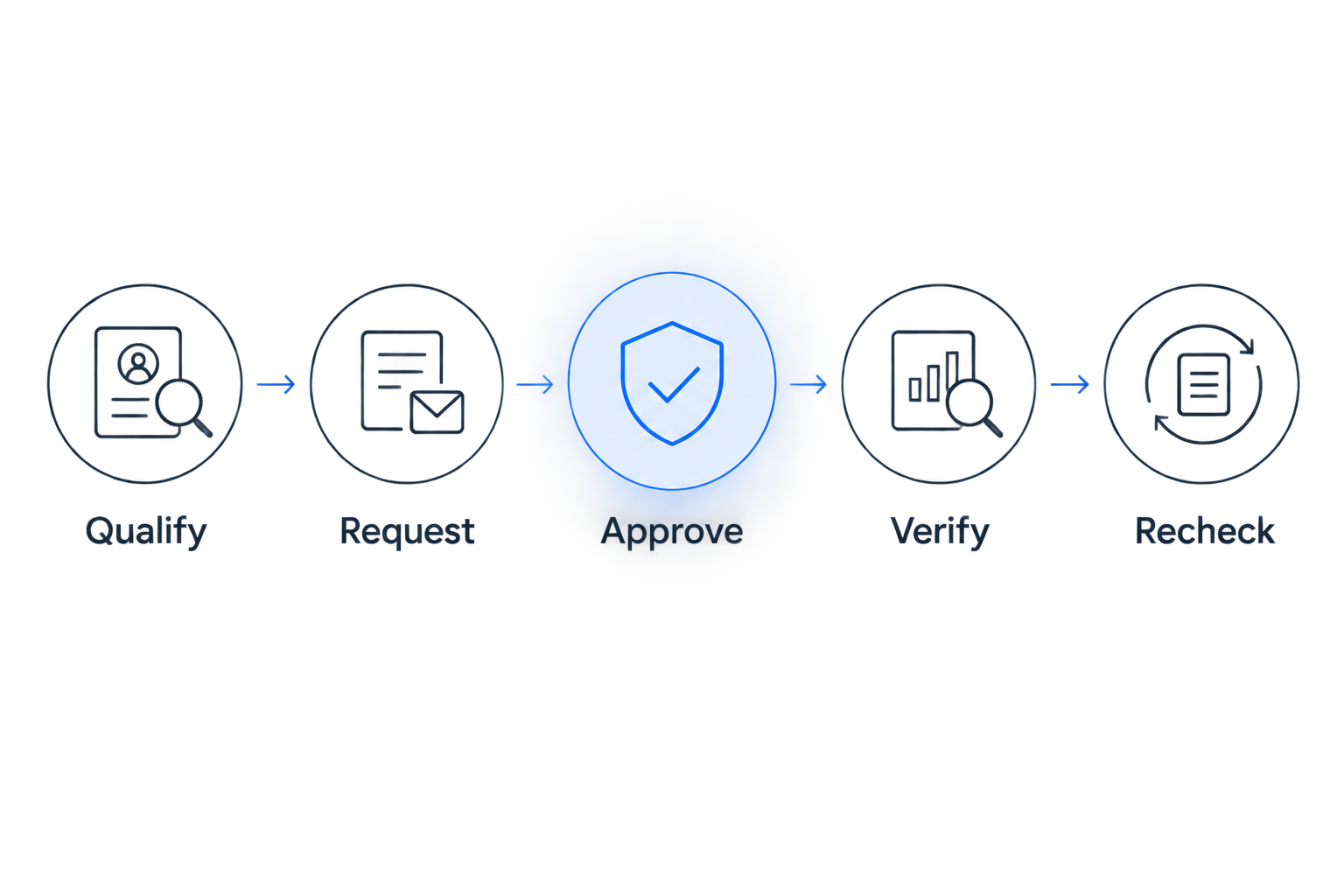
A 2026 agency brief should specify these reporting fields before outreach starts. Linkible link building enquiries should use the same standard: ask how publisher relevance, editorial decisions and published evidence will be reported.
Repeat the workflow when a resource changes
A resource-update workflow is useful when an existing destination has materially changed. Best for: correcting outdated references or helping an editor assess a genuinely improved resource—not manufacturing a reason to email again.
- Identify published references affected by the change. Read each article rather than sending a campaign-wide announcement.
- Explain precisely what changed and whether the publisher’s current wording remains accurate.
- Request a correction only where needed. Preserve the existing destination when it still serves the reader; do not request a new anchor merely to target another keyword.
- Recheck the published result and update Verification date, Anchor text and any relevant notes.
This variant preserves useful editorial relationships, but it still requires manual judgement. An updated destination does not automatically justify another message to every publisher.
Troubleshooting
The editor agrees, but nothing is published
Keep Status at Approved. Ask whether the update remains scheduled, record the response and close the record if the editor withdraws. Do not include the request in verified-link totals.
The link points to the wrong page
Record the actual destination and request a correction with the intended URL and context. Keep the record outside Verified until the public link matches the agreed destination.
The editor uses a different anchor
Check accuracy before requesting a change. Descriptive wording that fits the sentence is acceptable; an anchor that misrepresents the destination needs correction. Do not turn an editorial improvement into an exact-match negotiation.
The editor adds a sponsored or nofollow attribute
Record the attribute accurately. For commercial placements, appropriate qualification is part of correct implementation, not a defect to remove; for editorial links, the publisher retains control over link treatment.
A previously verified link disappears
Reopen the record and inspect the article before contacting anyone. The content may have been revised or the destination changed; ask for clarification without claiming a permanent placement unless an explicit agreement supports it.
Customise your workflow
For SaaS outreach, add Use case and Audience so the reviewer can distinguish a relevant technical reference from a generic software mention. For ecommerce outreach, add Buying question to explain why the destination belongs in that article.
When evaluating Linkible or another link building agency, request a reporting example that shows editorial context and verification—not just authority scores. Managed outreach reduces your coordination work, but it does not remove your responsibility to approve suitable destinations and commercial terms.
Keep search outcomes in a separate reporting view. Track relevant landing-page performance alongside campaign activity, without attributing every movement to an individual backlink.
FAQ
What is a niche edit request workflow?
A niche edit request workflow is the process of qualifying an existing article, requesting a relevant link, recording the editorial decision and verifying publication. It should end with evidence of the live backlink, not an approval email.
Are niche edits against Google’s rules in 2026?
Adding an editorial reference to an existing article is not inherently against Google’s rules. Buying links for ranking purposes is link spam; advertising links need appropriate qualification, such as sponsored or nofollow.
What is the best page to use for a niche edit request?
The best destination directly answers a question raised by the publisher’s article. Choose the page for its reader value and contextual fit, not solely because it targets a commercially important keyword.
Should I ask for exact-match anchor text?
Do not make exact-match anchor text a condition of an editorial request. Suggest accurate context and let the editor choose wording that fits the article.
How do I know when a niche edit is complete?
A niche edit is complete when you verify the public link, its destination, surrounding context, anchor text and link attributes. Record the verification date because the article can change later.
Can Linkible manage niche edit outreach?
Linkible offers niche edits and white-hat outreach as part of its link building services. Discuss your target pages, publisher criteria, approval process and reporting requirements before agreeing the scope.
Does a published niche edit guarantee better rankings?
No published niche edit guarantees better rankings. Publication confirms that a link exists; search performance depends on more than a single placement.
One last thing
An editor’s refusal to use your preferred anchor is not necessarily a failed request. It can preserve the distinction between an editorial citation and a placement dictated by the advertiser.
For your next 2026 campaign, approve the relevance criteria before approving the outreach list. That decision prevents unsuitable requests earlier than any publication checklist can.
Related guides
- CRM tools for managing link building outreach
- Niche edits for enterprise SaaS companies
- Anchor text strategies ranked by risk
Ready to delegate the workflow? Contact Linkible with your target pages, audience and publisher requirements to discuss the outreach scope and reporting you need.