Compare the best CRM tools for link building outreach. BuzzStream leads for publisher relationships; assess workflows, reporting and agency support.
Best overall: BuzzStream. Best for multi-campaign outreach: Pitchbox. Best for an existing sales CRM: HubSpot. These are the best CRM tools for link building outreach in 2026 when you need publisher relationships, follow-ups and placement records organised around a clear workflow.
- BuzzStream leads the best CRM tools for link building outreach shortlist for publisher relationship management.
- Pitchbox suits teams coordinating prospecting, outreach campaigns and follow-ups.
- HubSpot and Pipedrive suit teams extending an existing CRM into blogger outreach.
- Airtable suits custom placement tracking; software does not replace publisher qualification or relevant pitches.
Why this matters
A link-building CRM should tell you who owns each publisher relationship, what was promised and what happens next. A contact list alone cannot do that. Neither can an email dashboard that treats every reply as a successful outcome.
For SaaS and ecommerce teams comparing software with link building services, separate workflow problems from delivery problems. A CRM organises activity; relevant publishers, manual outreach and editorial judgement still determine whether that activity deserves a link.
Linkible is a link building agency for brands seeking outreach services rather than another CRM to operate. Choose software when you have someone to manage the work. Evaluate agency support when you need the outreach itself delivered.
What makes the best CRM for link building outreach?
Use these criteria before comparing interfaces or automation features:
- Publisher history: Keep previous conversations, website details and relationship ownership accessible before anyone sends another pitch.
- Follow-up control: Assign a next action and stop inappropriate follow-ups when a conversation changes direction.
- Campaign separation: Distinguish clients, target pages and outreach angles without creating disconnected contact lists.
- Placement tracking: Record the destination page, published article, anchor text and publication status separately from email activity.
- Reporting clarity: Separate contacted publishers, replies, editorial agreements and verified links. These are different outcomes.
For your 2026 shortlist, prioritise the weakest part of your current process. Better email sequencing will not fix poor publisher selection, and a detailed placement database will not write a relevant pitch.
Link-building CRMs at a glance
| Tool | Best for | Standout feature | Key limitation |
|---|---|---|---|
| BuzzStream | Publisher relationship management | Outreach-focused contact and conversation organisation | Still needs a clear placement-verification process |
| Pitchbox | Coordinated outreach campaigns | Prospecting and campaign follow-up workflows | A dedicated outreach platform adds another system to manage |
| HubSpot | Teams already using a sales CRM | Shared contact records and configurable pipelines | Link-specific records require configuration |
| Pipedrive | Owner-led outreach pipelines | Visible stages, activities and next actions | Publisher research remains a separate task |
| Airtable | Custom placement and relationship databases | Linked records and configurable views | Outreach execution needs a separate workflow |
These tools occupy different roles. BuzzStream and Pitchbox centre on outreach, while HubSpot and Pipedrive adapt sales processes. Airtable gives you a configurable database rather than a ready-made outreach operation.
1. BuzzStream: best CRM for publisher relationship management
BuzzStream organises outreach contacts, email conversations and campaign activity. Its outreach-focused structure makes it the strongest default here when your main problem is managing relationships with editors, bloggers and website owners.
For SaaS outreach, that means keeping a publisher relationship connected to the relevant campaign instead of scattering context across inboxes. For ecommerce outreach, it helps maintain context when the same publication covers several product categories.
BuzzStream pros:
- Outreach-focused records match publisher relationship work.
- Conversation history supports handovers between team members.
- Campaign organisation helps distinguish separate outreach efforts.
BuzzStream cons:
- Contact records still need consistent ownership and maintenance.
- Published links need checking; an email agreement is not a verified placement.
Best for: Teams whose central challenge is maintaining publisher relationships across recurring campaigns.
Before choosing BuzzStream, walk through an existing conversation from initial pitch to publication. Confirm that your team can find the last reply, assign the next action and record the resulting placement without creating conflicting records elsewhere.
Verdict: Buy BuzzStream when publisher relationship management is your main requirement.
2. Pitchbox: best CRM for coordinated outreach campaigns
Pitchbox combines prospecting and outreach campaign management, including follow-up workflows. It suits teams that want campaign execution organised within a dedicated outreach platform rather than adapted from a general sales CRM.
The distinction matters when several campaigns run at once. You need to keep prospect selection, outreach progress and replies connected without confusing activity volume with editorial progress.
Pitchbox pros:
- Prospecting and outreach sit within the same platform.
- Follow-up workflows support repeatable campaign execution.
- Campaign-based organisation suits teams coordinating separate outreach efforts.
Pitchbox cons:
- Automated workflows need careful exclusions and human supervision.
- A dedicated platform can overlap with records already held in another CRM.
Best for: Outreach teams whose main challenge is coordinating repeatable campaigns rather than building a general customer database.
In a 2026 evaluation, ask the vendor to demonstrate how a reply changes the follow-up workflow. Then check how your team would handle an existing publisher relationship appearing in a new campaign. Preventing an inappropriate message matters more than making that message easier to send.
Verdict: Buy Pitchbox when campaign coordination is the bottleneck; hold if your process is still undefined.
3. HubSpot: best CRM for teams already managing contacts there
HubSpot provides contact management, pipelines and activity records. You can configure those capabilities for publisher outreach, particularly when your marketing or partnerships team already works in HubSpot.
Its strongest argument is organisational continuity. Existing contact ownership and shared records can be more useful than introducing a specialist tool that nobody maintains.
HubSpot pros:
- Shared contact records give teams a common relationship history.
- Custom properties can capture publisher and campaign details.
- Pipelines make outreach progress visible beyond the outreach team.
HubSpot cons:
- A sales-oriented structure needs adapting for editorial relationships.
- Multiple placements from the same publisher need a deliberate record model.
Best for: SaaS and ecommerce teams already using HubSpot that want outreach visible alongside other business relationships.
Keep publisher outreach separate from customer acquisition stages. An editor is not a sales prospect, and a published article is not a closed customer. Define ownership rules so marketing, sales and partnerships do not send conflicting messages to the same contact.
Verdict: Buy into HubSpot for outreach when it is already your working CRM; skip a migration solely for link tracking.
4. Pipedrive: best CRM for owner-led outreach pipelines
Pipedrive organises relationships through pipelines, activities and assigned responsibilities. It works for link building when your biggest operational problem is dropped follow-ups or unclear ownership.
Build the workflow around editorial progress rather than a sales forecast. Each open opportunity should show its publisher, responsible person, next action and intended destination page.
Pipedrive pros:
- Pipeline stages make stalled opportunities visible.
- Assigned activities establish responsibility for follow-ups.
- Custom fields support outreach-specific context.
Pipedrive cons:
- Publisher discovery and relevance checks remain separate work.
- A pipeline alone does not provide a complete published-link register.
Best for: Teams that need a clear owner and next action for every active outreach opportunity.
During evaluation, enter a publisher with several possible article opportunities. Check whether the structure keeps the shared relationship clear without merging distinct placements. A useful pipeline shows what needs attention; it should not force unrelated editorial discussions into a single record.
Verdict: Buy Pipedrive when accountability is the main gap; skip it as a substitute for publisher research.
5. Airtable: best CRM alternative for custom placement tracking
Airtable lets you build linked tables and views around your own workflow. For link building, you can connect publisher records, individual contacts, outreach opportunities and published placements.
That flexibility suits teams with clear reporting requirements. It also transfers design responsibility to you: the database only reflects the rules you establish.
Airtable pros:
- Linked records separate relationships from individual placements.
- Configurable views serve campaign owners and reporting needs.
- Custom fields accommodate different publisher qualification criteria.
Airtable cons:
- You must design and maintain the database structure.
- Email outreach requires a separate execution process or configured integrations.
Best for: Teams prioritising a custom placement register and relationship database over a dedicated outreach interface.
Start with the records you need to report on, not every field you might eventually use. Record maintenance becomes harder when the team cannot distinguish required evidence from optional notes. Test whether someone outside the outreach team can understand a placement record without asking its creator.
Verdict: Buy Airtable when custom tracking is the priority; skip it if you need a ready-made outreach workflow.
How to evaluate an outreach CRM before committing
Use a 30-day pilot as a practical evaluation window, not a promised time to earn links. Run an existing campaign through the proposed system and assess whether it improves handovers, record accuracy and visibility.
Define the records
Separate 3 record types at minimum: publishers, contacts and placements. A publisher can have several contacts, and one contact can help with several placements. Treating all three as the same record makes relationship history difficult to interpret.
Set the stages
Start with 5 pipeline stages: Qualified, Contacted, Replied, Agreed and Published. Keep rejected or unsuitable opportunities outside the active pipeline. An agreement stays in Agreed until the published page has been checked.
Test the handover
Ask another team member to take over an active conversation using only the CRM record. They should identify the publisher, previous discussion, intended target page and next action without searching private notes.
Check the evidence
Open a published-placement record and inspect its supporting details. Record the live article address, destination page, anchor text, link attributes and verification date. Keep placement evidence separate from outreach activity totals.
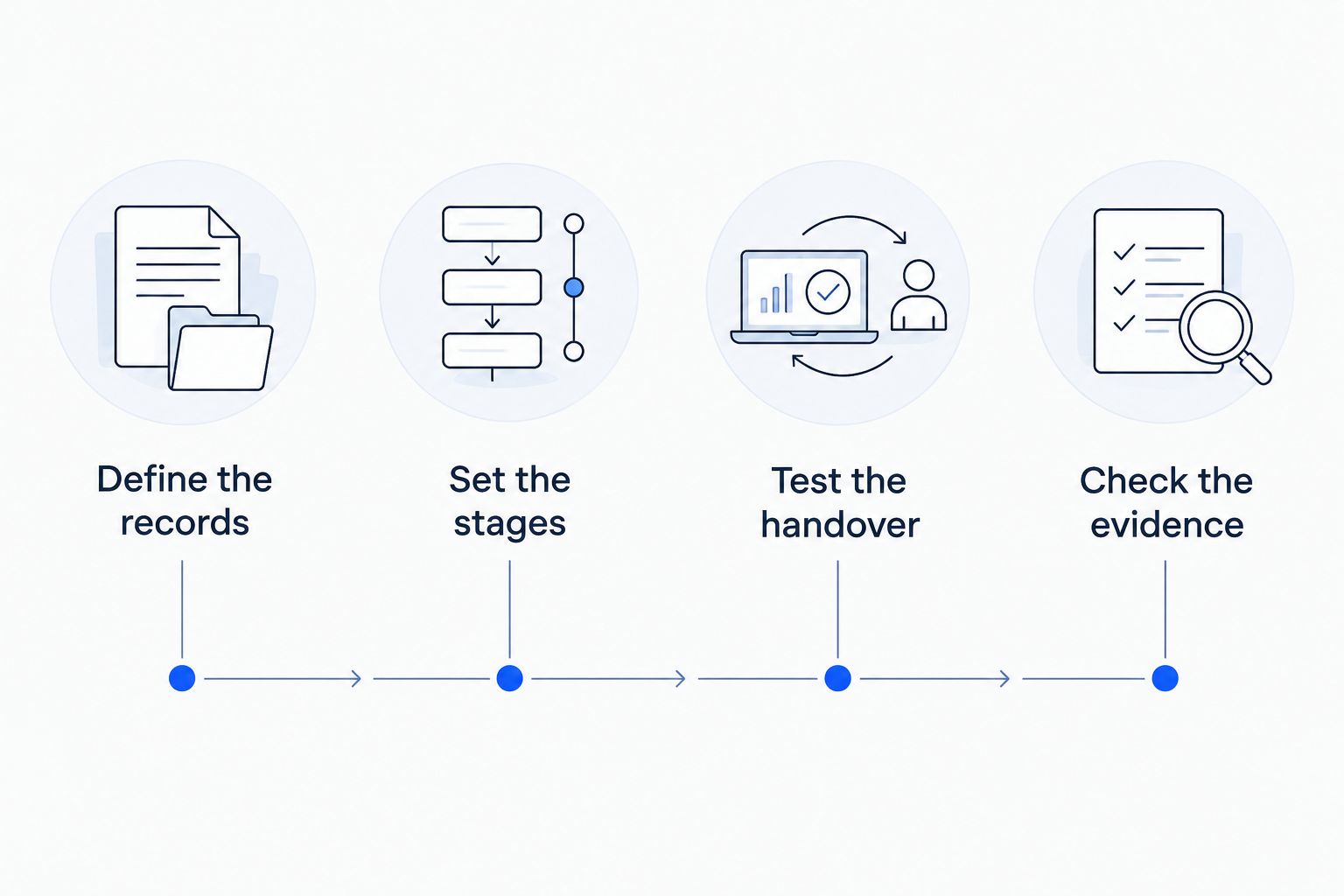
A 2026 CRM decision should survive this operational test. If a system looks impressive in a demonstration but leaves your team maintaining a second unofficial spreadsheet, resolve that gap before committing.
How these tools were ranked
The ranking prioritises publisher history, follow-up control, campaign separation, placement tracking and reporting clarity. It reflects workflow fit, not a performance benchmark or a claim that any tool produces better rankings.
BuzzStream takes the default position because its outreach focus matches publisher relationship management. Pitchbox serves campaign coordination; HubSpot and Pipedrive serve existing CRM workflows; Airtable serves custom database requirements.
Linkible's buyer recommendation is to assess the outreach process before buying automation. Ask who qualifies publishers, who reviews pitches and who verifies live placements. Software supports those responsibilities; it does not assume them.
Which outreach CRM should you choose?
Choose BuzzStream unless you have a stronger, specific workflow requirement. Choose Pitchbox for coordinated outreach campaigns, HubSpot for an existing shared CRM, Pipedrive for next-action accountability, or Airtable for custom placement records.
For your 2026 decision, separate the software purchase from the delivery decision. If your team cannot assign an owner to prospect research, manual outreach and placement verification, another platform leaves the core work undone.
FAQ
What's the best CRM for link building outreach in 2026?
BuzzStream is the default recommendation for publisher relationship management. Pitchbox is the stronger fit when coordinated outreach campaigns are the main requirement.
Is HubSpot suitable for link building outreach?
HubSpot is suitable when your team already uses it and can configure publisher-specific records and pipelines. Keep editorial outreach separate from customer sales stages.
Is Pitchbox better than BuzzStream?
Pitchbox is the better fit for coordinated campaign execution; BuzzStream is the default for publisher relationship management. Evaluate both against an existing campaign rather than choosing on automation alone.
Can I use Airtable instead of an outreach CRM?
Airtable can manage publisher, contact and placement records. You still need an email outreach process and someone responsible for maintaining the database.
What should a link-building CRM report include?
A link-building CRM report should distinguish contacted publishers, replies, editorial agreements and verified placements. Placement records should include the published article, destination page, anchor text and verification date.
Will an outreach CRM improve my Google rankings?
An outreach CRM does not guarantee rankings. It organises relationships and activity; publisher relevance, editorial decisions and the quality of your destination content remain separate considerations.
Should I buy outreach software or hire a link-building agency?
Buy software when your team can own publisher research, pitches, follow-ups and verification. Evaluate an agency when you need those activities delivered rather than another system to manage.
One last thing
A reply is not a backlink, and an agreement is not a published placement. Preserve that distinction in every dashboard. Otherwise, your reporting rewards intermediate activity while hiding unfinished work.
If you need delivery rather than software administration, contact Linkible with your target pages, audience and current outreach process. Ask for a scope covering publisher relevance, manual outreach, deliverables and placement reporting before choosing a service.