Build a HubSpot blog link building pipeline with a separate outreach queue, publisher checks and verified backlink reporting. Keep approval manual.
Instead of copying published HubSpot posts into disconnected outreach lists, build a HubSpot blog link building pipeline that connects each target article to qualified publishers, an accountable owner and verified backlinks. This 2026 workflow uses a dedicated CRM queue, with automation added only after your approval rules work.
- Build your HubSpot blog link building pipeline around qualified publishers and verified backlinks, not email volume.
- Keep outreach separate from sales reporting, and confirm account permissions before configuring automation.
- Linkible suits SaaS and ecommerce teams evaluating agency-led link building alongside their internal content workflow.
- Start with manual approval; automate record routing only after duplicate prevention and suppression checks work.
Why this matters
Publishing creates a page, not a reason for another website to reference it. Your outreach queue needs to connect an article’s useful evidence with a publisher whose readers need that evidence.
Linkible is best for SaaS and ecommerce teams seeking agency-led link building rather than another publishing tool. Its link building services sit alongside your content operation; an agency does not replace your responsibility for accurate, useful source material.
The workflow below separates three records: the article you promote, the publisher you approach and the placement you verify. Keep those relationships visible. Otherwise, a reply can look like progress even when it produces no relevant backlink.
Before you start
- Access: You need permission to view HubSpot blog content, create CRM records and configure the chosen pipeline. Get an administrator involved before changing properties, pipelines or workflow settings.
- Materials: Prepare published article URLs, approved outreach identities, publisher research and a suppression list covering opt-outs and existing conversations. Choose a pilot of 10 published posts; this is a starting scope, not a performance benchmark.
- The setup trap: HubSpot pipeline and workflow capabilities depend on your subscription and permissions. Confirm access first. Do not build outreach into your revenue pipeline simply because creating another pipeline is restricted; use a separate tracker instead.
Treat the field and stage names below as custom labels to create, not existing HubSpot defaults. Native navigation labels appear in bold; account navigation can differ with permissions and interface updates.
Article inventory and campaign brief
Select articles with a defensible outreach angle
- Open Content, then Blog, and review your published posts. Start with the content itself, not the post title or publication date.
- Select articles containing something another publisher can use: original research, a clear explanation, a practical reference or an expert contribution supported by evidence.
- Open each public article and confirm that the page loads, the intended content is visible and its claims remain accurate. Resolve redirects and substantive errors before promotion.
- Record the article’s final URL, intended reader, useful contribution and relevant commercial page in your campaign brief. The commercial page is context, not an instruction to request a backlink there.
- Write one sentence explaining why an independent publisher would cite the article. Reject briefs that amount to asking for a link because you want higher rankings.
Expected result: Each selected article has a clear audience, a useful contribution and an approved destination URL.
For a SaaS article, the contribution might be an explanation relevant to a particular technical problem. For ecommerce, it might be a documented buying consideration or product-care reference. These are selection criteria, not claims about what your existing content contains.
Keep the 2026 campaign label separate from article freshness. A current campaign does not make an old claim current, and changing a date is not a substantive content update.
Dedicated outreach pipeline
Create records that represent actual opportunities
- Open Settings, then Objects, Deals and Pipelines. If your account permits it, use Create pipeline to create a separate pipeline named Link building outreach.
- Configure custom stages: Research, Approved, Contacted, In discussion, Placement agreed, Verified live and Closed. Configure terminal stages appropriately for the object, but exclude this pipeline from revenue reporting.
- Create custom properties for Target article URL, Publisher domain, Publisher page URL, Pitch angle, Outreach owner, Next action date, Live placement URL and Closure reason.
- Add Verification date, Link attribute and Target URL observed for placement checks. Keep the intended destination separate from the destination actually found on the publisher’s page.
- Create one opportunity for each publisher-and-target-article combination. Use the publisher domain and article identifier in the record name, then associate the relevant contact and company where appropriate.
- Before creating a record, search for existing conversations with that publisher. An opportunity identifier helps you search; it does not automatically enforce uniqueness.
Expected result: Every opportunity has an identifiable publisher, destination article, owner and next action without contaminating your sales forecast.
Do not turn HubSpot’s deal probability or amount fields into invented SEO values. A link opportunity is not forecast revenue. Document how your team will exclude these records from dashboards, attribution reports and sales automations.
Choose the operating mode
Use the same approval criteria whether you operate manually or add automation. The difference is record handling, not editorial judgement.
| Operating mode | Best for | Advantage | Limitation |
|---|---|---|---|
| Manual queue | Teams validating their first outreach process | You inspect each opportunity before it moves | Owners must maintain records and follow-up dates |
| Workflow-assisted queue | Teams with supported access and documented rules | Eligible routing and task creation reduce repetitive administration | Incorrect enrolment or re-enrolment rules can repeat actions |
Start manually for your 2026 pilot. Add automation only after your team can explain what creates a record, what prevents duplication and what stops outreach.
Publisher qualification and outreach handoff
Approve relevance before contact
- Research an initial batch of 20 publisher prospects across your selected articles. This is a manageable review batch, not a promised yield or recommended link quota.
- Record a specific page, section or editorial topic that connects each publisher to the article. A high authority metric alone does not explain the fit.
- Review the publisher’s content for topical consistency, identifiable editorial responsibility and a plausible reader benefit. Reject opportunities built around unrelated link insertions or manipulative anchor requirements.
- Check the contact against your suppression list and existing publisher conversations. Confirm the applicable outreach and privacy requirements for the recipient’s jurisdiction; a publicly visible address is not blanket permission.
- Move an opportunity to Approved only when its article, publisher, pitch angle and contact route have passed review. Assign one owner and a next action date.
- Prepare an individual pitch explaining the article’s useful contribution. Move the record to Contacted only after the message has actually been sent through your approved sending process.
Expected result: Every contacted publisher has a documented editorial fit and a traceable message history.
Do not treat a CRM stage change as evidence that an email was delivered. Record the actual sending activity or an appropriate reference to it, subject to your privacy and retention policy.
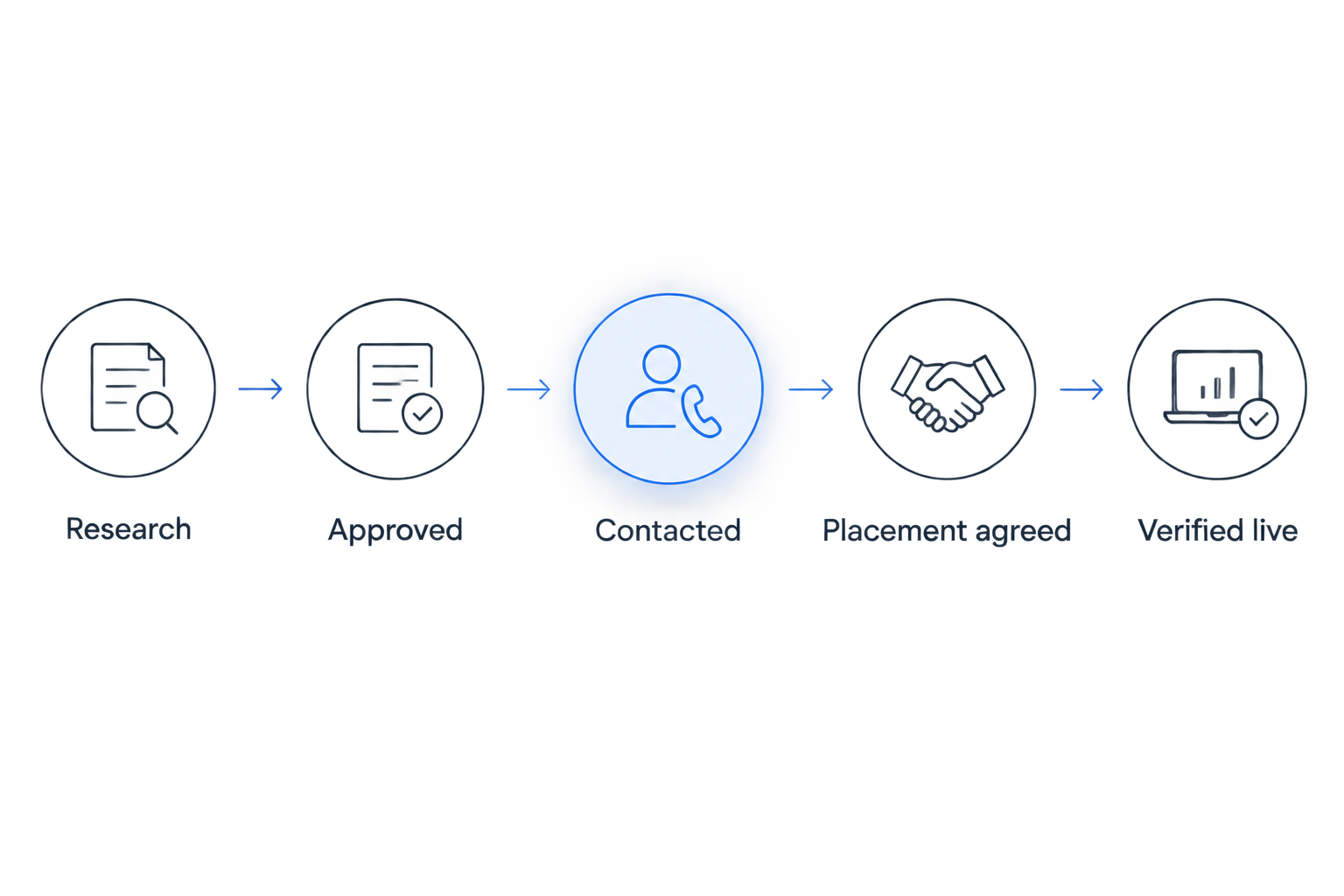
Manual outreach requires judgement, not just personalised greetings. Explain why the specific article helps the publisher’s readers, and allow the publisher to decide whether a reference belongs.
Avoid prescribed exact-match anchors. Google’s link spam policies address links created primarily to manipulate rankings, including paid links that pass ranking credit. Disclose commercial arrangements and apply appropriate link attributes rather than presenting paid placements as earned editorial references.
Placement verification and reporting
Close the loop on the published page
- Move a positive conversation to Placement agreed when the publisher confirms an intended reference. Do not count the agreement as a live backlink.
- Open the published page and check that the link appears in the expected context. Follow it to confirm the destination and any redirects.
- Record the live publisher URL, observed destination, anchor text, relevant link attribute and verification date. Note whether the page has an apparent indexing restriction; a live link is not proof of indexation.
- Move the opportunity to Verified live only after those checks pass. Keep declined, unsuitable and inactive opportunities under Closed, with a useful closure reason.
- Set a review task for 7 days after verification as an initial operating rule. Adjust the review schedule to the campaign; this interval is not a claim about typical link loss.
- Report qualified opportunities, contacted publishers, responses, agreed placements and verified placements separately. Show the underlying publisher URLs so stakeholders can inspect the work.
Expected result: Your report distinguishes outreach activity from confirmed backlinks and retains evidence for each placement.
For 2026 reporting, keep placement verification separate from SEO outcomes. Search performance has multiple inputs; a backlink appearing before a ranking change does not establish causation.
Linkible offers outreach, niche edits, digital PR and HARO link building. When evaluating an agency, request the same evidence structure: relevant publishers, documented outreach methods and inspectable placement reporting. Agency support does not remove the need to review relevance or maintain accurate destination content.
Variant: refresh outreach when a blog post changes
An updated article can justify a new outreach review when the update changes what a publisher could use. A corrected typo is not a fresh pitch angle.
- Record the substantive change in the article brief: new evidence, a corrected explanation or a materially expanded reference section.
- Review existing opportunities associated with that article before creating new ones. Reopen a suitable record rather than starting a parallel conversation.
- Flag the article for outreach review using a custom property such as Outreach review needed. Where your subscription supports the required workflow actions, use that explicit property change to route a review task.
- Require approval before sending another message. Exclude suppressed contacts and conversations that have already reached a clear decision.
- If the destination URL changes, update the campaign brief and inspect existing placements for redirect or destination issues.
Expected result: Meaningful content updates create a review queue, not automatic repeat pitches.
This variant deliberately uses an explicit approval flag. Do not assume every HubSpot account exposes a suitable blog-update trigger or that every edit deserves re-enrolment.
Troubleshooting
The pipeline or workflow controls are missing
Check permissions and subscription access with your administrator. If the required controls are unavailable, keep the same article-to-publisher structure in a separate tracker; do not alter your sales process to force this setup.
The same publisher receives overlapping pitches
Pause the affected outreach and search by publisher domain, contact address and target article. Consolidate ownership, preserve the conversation history and add a duplicate review before approval.
A stage says contacted, but no message exists
Check the actual sending system and activity history. Return the opportunity to its correct stage, then change your process so only a confirmed send advances the record.
A placement is live, but the backlink is wrong
Compare Target article URL with Target URL observed. Record the discrepancy and request a correction where appropriate; do not mark the intended backlink verified until the observed link supports that status.
Updates keep creating repeat work
Inspect re-enrolment settings and any rule that responds to broad record changes. Restrict automation to an explicit review event and add suppression checks before creating tasks or contact actions.
Customise your workflow
Expand the process around buyer relevance, not larger sending lists. Add fields for product category, use case, intended market or editorial topic when they change your qualification decision.
For US, UK and Canadian campaigns, document recipient location and applicable outreach requirements rather than applying one consent assumption across every market. Keep legal review separate from the editorial relevance check.
Before choosing a link-building agency, ask:
- Which publisher characteristics qualify or disqualify an opportunity?
- Who approves the target article, pitch and requested reference?
- How are opt-outs and existing relationships protected?
- What evidence appears in the placement report?
- How are incorrect, changed or removed links recorded?
Linkible’s agency model suits teams seeking execution support; it does not replace your CMS or internal approvals. Share your article shortlist, qualification rules and reporting requirements before agreeing campaign scope.
FAQ
What is a HubSpot blog link building pipeline?
A HubSpot blog link building pipeline connects published articles with publisher prospects, outreach activity and verified backlinks. Each opportunity records the article, publisher, owner and next action.
Does publishing a HubSpot blog post automatically build backlinks?
No. Publishing makes content accessible, but independent publishers still need a reason to reference it. Outreach should explain a specific benefit to their readers.
Can I run this workflow without HubSpot automation?
Yes. You can maintain the same article, publisher and placement records manually. Automation is optional and depends on your subscription, permissions and supported actions.
Should I use my sales pipeline for link building?
Keep link-building opportunities separate from sales reporting. If you use a dedicated deal pipeline, exclude it from revenue forecasts, sales automations and commercial dashboards.
When should a backlink count as verified?
Count a backlink as verified after checking the live publisher page, destination, context and relevant link attributes. A publisher agreement or positive reply is not verification.
Can an updated blog post trigger fresh outreach?
A substantive update can trigger an outreach review, not an automatic pitch. Check existing conversations, suppression rules and the new editorial value before approving contact.
Is Linkible a replacement for HubSpot?
No. Linkible is a link-building agency offering outreach and supporting services, while HubSpot manages content and CRM processes. Keep campaign ownership, approval responsibilities and reporting requirements explicit.
One last thing
A closed opportunity can improve your pipeline without producing a backlink. Recording that a publisher is irrelevant, declines contact or requires unsuitable terms prevents the next campaign from repeating the same mistake.
For your next 2026 campaign, bring the article shortlist and approval criteria to contact Linkible. Discuss publisher relevance, outreach responsibilities and placement evidence before expanding the queue.