Build a WordPress blog backlink pipeline around relevant publishers, manual outreach and verified links. Follow the workflow and avoid duplicate pitches.
Instead of manually hunting for backlinks after every WordPress post, build a WordPress blog backlink pipeline that turns approved articles into qualified publisher prospects, personalised outreach and verified placements. This 2026 workflow uses a shared tracking sheet and human approval gates, so publishing creates a review task—not an automatic email blast.
- A WordPress blog backlink pipeline should create outreach tasks, not automatically send pitches whenever you publish.
- Linkible suits SaaS and ecommerce teams seeking managed link building rather than a WordPress automation plugin.
- Qualify publisher relevance before outreach, then verify every reported backlink on the live referring page.
- Keep new articles and substantial updates in separate queues to prevent duplicate pitches.
Why this matters
Publishing and earning backlinks are separate jobs. WordPress handles your content; someone still needs to identify relevant publishers, explain why an article deserves a reference and verify the resulting link.
Linkible is best for SaaS and ecommerce teams seeking managed link building rather than WordPress automation software. When evaluating Linkible, assess the outreach scope, publisher relevance and reporting requirements against this workflow. An agency engagement still needs your subject expertise, content approvals and clear exclusions.
For your 2026 process, separate activity from outcomes. Emails sent are activity; relevant referring pages with verified links are deliverables. Neither proves that rankings or qualified enquiries increased.
Before you start
- Access and ownership: Have permission to review WordPress settings, edit the target articles and use an authorised outreach mailbox. Assign one person to approve publisher prospects and another to handle replies if those responsibilities differ.
- Working materials: Prepare a shared tracking sheet, a list of target articles and supporting evidence for each pitch. Choose one pilot article and an initial batch of 10 publishers; these are setup recommendations, not performance benchmarks.
- The non-obvious gotcha: A published post is not necessarily ready for outreach. Privacy settings, page-level indexing directives or a canonical pointing elsewhere can undermine the target URL. Publishing or updating a post must not bypass the content approval gate.
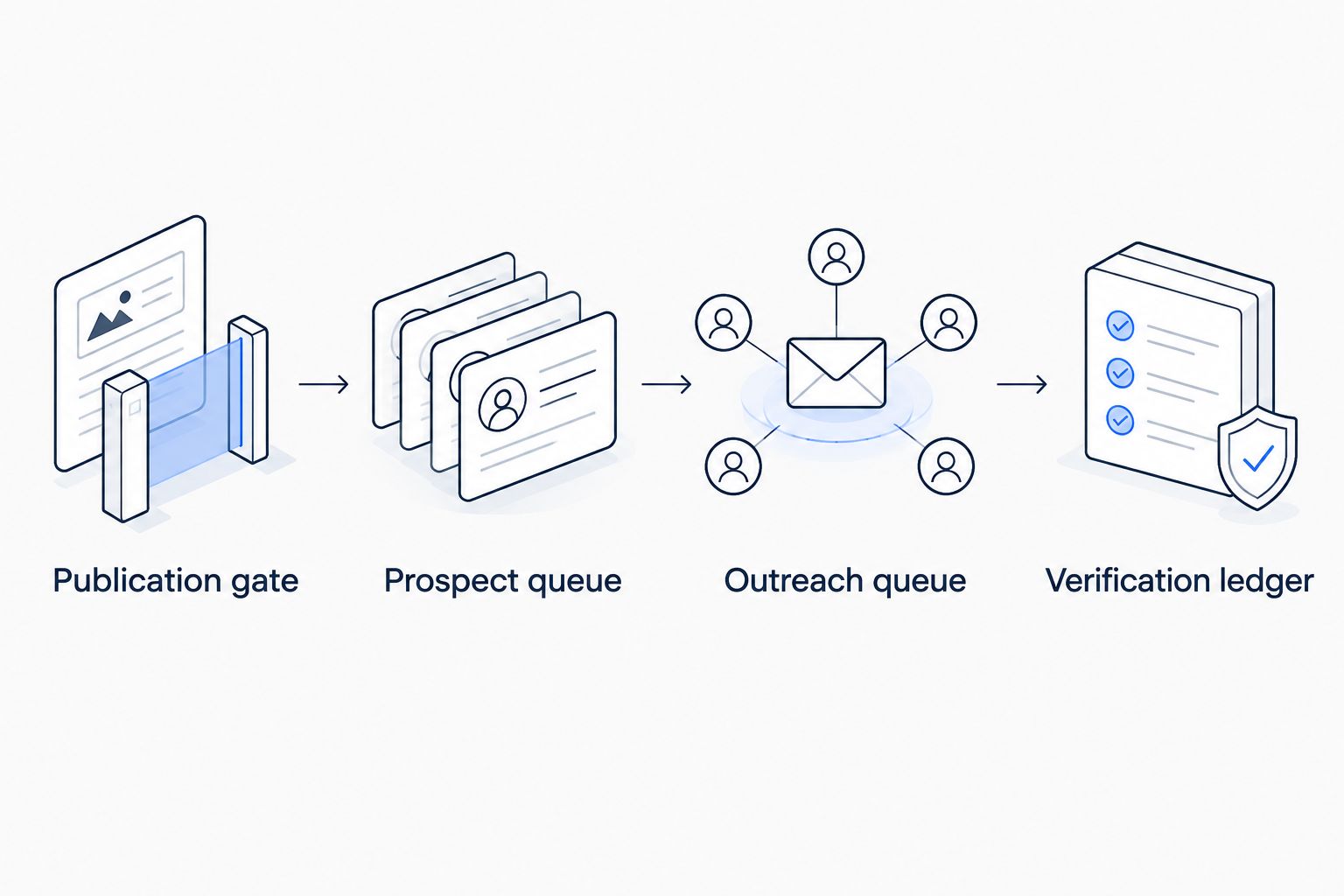
Publication gate
The publication gate decides which WordPress articles deserve outreach. It is a quality checkpoint, not a requirement to promote everything your editorial calendar produces.
- Open Posts, then All Posts, and locate your pilot article. Use View to inspect the public page rather than relying on the editor preview.
- In WordPress, open Settings, then Reading. Under Search engine visibility, check that Discourage search engines from indexing this site is not selected for a production site intended for search. If you change it, select Save Changes. This setting does not guarantee indexing; check page-level directives separately.
- Review the article while signed out. Confirm that it loads without authentication, that supporting sources work and that the headline matches what the page actually delivers.
- Identify the linkable contribution. Record whether the article contains original evidence, a documented process, a practical template or a clear explanation that supports another publisher’s article.
- Create these tracking-sheet columns: Asset URL, Audience, Linkable contribution, Relevant destination, Owner and Approval status. These are labels you create, not native WordPress fields.
- Set Approval status to Approved only after the content and technical checks pass. Keep unsupported claims and thin summaries out of the outreach queue.
Expected result: You have one publicly accessible article with a documented reason for another publisher to cite it.
For SaaS content, describe the reader’s problem rather than pitching a product announcement as an editorial resource. For ecommerce content, distinguish a genuinely useful buying or maintenance resource from a category page that primarily sells products. Neither deserves a backlink simply because it exists.
Prospect queue
A prospect queue connects each approved asset to a specific editorial opportunity. A relevant domain alone is not enough: the proposed referring page must have a reason to reference your article.
- Find existing articles and publications that address the same audience or a closely related problem. Read the actual pages before adding them to your sheet.
- Create Publisher, Referring page, Contact, Relevance reason, Suggested placement, Qualification status and Rejection reason columns.
- Write one sentence explaining the editorial fit. Identify the claim, paragraph or reader question that your article would support. Reject prospects where the only argument is a high authority score.
- Check the publisher’s subject coverage and editorial consistency. Exclude unrelated sites, obvious link-selling networks and pages built around arbitrary commercial links.
- Search your existing records for the publisher, contact and proposed referring page. Merge duplicate opportunities before assigning an owner.
- Move suitable records to Qualified. Keep rejected records with the reason attached so another team member does not repeat the same research.
Expected result: Your initial batch contains 10 distinct publishers with page-level relevance notes—not just a list of domains.
A domain-level authority metric can help organise research, but it cannot establish editorial relevance or prove a publisher is trustworthy. Approve the referring-page opportunity before approving the metric.
For larger teams, the same fields can move into a customer relationship management system. The CRM tools for managing link-building outreach guide addresses that next layer of organisation; preserve your qualification rules when changing systems.
Outreach queue
The outreach queue converts qualified research into a specific editorial request. Keep the first campaign manual so you can inspect each message and catch weak prospecting before increasing volume.
- Add Pitch angle, Assigned owner, Approval, Sent date, Follow-up date, Reply status and Suppression status columns.
- Draft a message that identifies the relevant referring page, explains the contribution your article makes and gives the recipient enough context to assess the request. Avoid generic praise and unsupported claims about the publisher’s readers.
- Ask an editor to consider the resource where it genuinely improves the page. Do not demand exact-match anchor text, a particular link attribute or a promise that the placement will remain indefinitely.
- Have the assigned owner approve the recipient, message and target article. Send only after the record is marked Approved and the contact is not suppressed.
- Record the send immediately. As a starting policy, schedule one follow-up after 7 calendar days; this is an operating choice, not an evidence-backed optimum. Stop on rejection or an opt-out request, and apply the rules relevant to the recipient’s jurisdiction.
- Classify replies as Interested, Declined, Needs information or Closed. Keep genuine editorial replies separate from automated responses.
Expected result: Every contacted publisher has a traceable pitch, an owner and a defined next action.
Automate reminders before you automate sending. A reminder preserves editorial judgement; an automatic send repeats whatever errors entered the queue. If you later connect WordPress to another system, make the publication event create a draft task behind the same approval gate.
The core sequence is deliberately simple: approve the asset, qualify the publisher, approve the pitch and verify the placement. Each hand-off needs a named owner.
Verification ledger
A positive reply is not a backlink. Your verification ledger records what actually appeared and separates live placements from promised, missing or changed links.
- Add Live referring URL, Destination URL, Anchor text, Link attribute, Verified date and Placement status columns.
- Open the live referring page and locate the link. Confirm that it points to the intended article rather than another destination, a broken address or an unexpected redirect.
- Inspect the link’s HTML and record relevant attributes, including
nofollow,sponsoredorugcwhere present. Do not infer link attributes from how the text looks on screen. - Record the placement as Verified only after checking the live page. Keep screenshots as supporting evidence, not substitutes for a working referring URL.
- Set an initial recheck for 30 days after verification. Treat that interval as a maintenance choice, not a promise about link longevity, and record later removals or destination changes.
Expected result: Your 2026 placement report distinguishes verified links, pending opportunities, removed links and rejected prospects.
When a campaign also includes press distribution, how long press releases stay live belongs in the verification plan: record the referring URL and recheck its status rather than treating publication as permanent. Keep syndicated release placements separate from individually earned editorial references.
Report search performance separately from delivery. Compare relevant landing-page impressions, clicks and qualified enquiries over a defined period, but do not attribute every change to newly acquired backlinks. Content changes and other search factors also affect outcomes.
When an existing WordPress article changes
An updated post needs a different trigger from a new publication. Correcting punctuation does not create a new editorial reason to contact a publisher.
Use these two routes in your 2026 workflow:
| Route | Best for | Advantage | Limitation |
|---|---|---|---|
| New publication | A newly approved resource with a clear linkable contribution | Creates a clean prospecting brief | A new URL alone does not justify outreach |
| Substantial update | New evidence, a revised method or a materially improved resource | Gives existing prospects a specific reason to reconsider | Minor edits can produce repetitive, unwanted pitches |
- Add Update summary and Last outreach date to the asset record.
- Describe what changed and why a publisher’s reader benefits. If that sentence contains no substantive difference, stop the update workflow.
- Recheck the target page’s technical status, claims and supporting sources.
- Compare proposed recipients with previous outreach, replies and suppression records.
- Approve a fresh pitch only where the update creates a relevant new angle.
Expected result: Meaningful revisions create reviewed opportunities; routine edits do not reopen closed conversations.
If your eventual integration reacts to post updates, require an explicit approval field as well as the update event. Otherwise, routine maintenance can generate duplicate tasks even when no outreach is warranted.
Troubleshooting
The published article cannot be accessed
Check the public page while signed out. Review visibility restrictions, site settings and page-level directives before contacting anyone. Correct the underlying issue, then repeat the publication gate; an editor preview is not proof of public access.
The same publisher receives duplicate pitches
Use one owner per opportunity and check both publisher-level and contact-level history. Match the normalised publisher domain, proposed referring page and target article before creating a new record. A different employee at the same publication is not automatically a new opportunity.
Publishers reply, but no links appear
Separate interest from commitment and verification. Ask for clarification where a reply is ambiguous, record any agreed next action and keep the opportunity out of the verified-placement total until the link is live. Do not count an email promise as delivery.
Reported links have different destinations or attributes
Inspect the live page and correct the ledger. If a placement differs from an agreed requirement, raise the specific discrepancy with the responsible party. Do not silently relabel it or assume an attribute change makes the link worthless.
Links are delivered, but enquiries do not increase
Check whether the target content reaches the right buyer and offers a relevant next step. Review referral visits and organic landing-page performance separately. Backlink delivery and commercial performance are different measurements; neither should conceal the other.
Customise your workflow
For SaaS teams, add product area, buyer role and technical reviewer fields. For ecommerce teams, add product category, seasonal relevance and content ownership. These fields make publisher relevance easier to assess without turning the sheet into a generic contact database.
If you are evaluating Linkible for managed link building, use the workflow as your briefing checklist. Ask what publisher research, outreach approvals, live-link verification and reporting the proposed scope includes. Confirm responsibilities rather than assuming every task is included.
Keep manual review wherever a decision affects relevance, reputation or reporting accuracy. Automate approved record creation, reminders and hand-offs only after the pilot works reliably.
FAQ
What is a WordPress blog backlink pipeline?
A WordPress blog backlink pipeline is a repeatable process that moves approved articles through publisher research, outreach and live-link verification. Publishing starts the process; it does not automatically earn a backlink.
Can WordPress automatically build backlinks when I publish?
Publishing a WordPress post does not automatically create editorial backlinks. You can configure task creation around publication events, but publisher selection, outreach approval and placement verification still need defined controls.
Do I need a plugin to start this workflow?
No plugin is required for the manual workflow described here. WordPress access, an authorised outreach mailbox and a shared tracking sheet are enough to run the pilot.
Which blog posts should I promote for backlinks?
Promote articles with a specific contribution that another publisher can reference. Original evidence, documented methods and practical resources provide clearer outreach angles than an article that only repeats existing advice.
Should I use the same outreach message for every publisher?
No. Each message should explain the fit between a specific referring page and your article. A consistent structure is useful, but the relevance argument must reflect the actual editorial opportunity.
How do I know whether a reported backlink is real?
Open the live referring page, find the link and check its destination and attributes. Record the verification date and recheck later rather than relying solely on a screenshot or outreach reply.
Can Linkible manage link building for a WordPress blog?
Linkible offers link-building and outreach services for brands, including SaaS and ecommerce businesses. Use your enquiry to confirm the target articles, publisher criteria, approval responsibilities and reporting scope for your WordPress content.
One last thing
Your suppression list deserves the same care as your prospect list. Keeping declined, unsuitable and previously contacted publishers visible prevents the team from repeating mistakes. In 2026, a cleaner queue is a more useful operating asset than a larger unqualified contact list.
Related guides
Ready to assign the outreach work? Contact Linkible with your target articles, audience, publisher exclusions and reporting requirements so the proposed scope addresses the actual pipeline.